Token 流式模拟器运行界面

用 ChatGPT 的时候你有没有想过一个问题:它的回答是"一个字一个字往外蹦"的,像有人在你面前打字。而百度搜索是转着圈加载几秒,然后"啪"一下整页出来。为什么聊天 AI 不学搜索引擎,先算完再一次性给你?

答案不是炫技,是流式输出(Streaming)——而且它其实是在救你的耐心。这篇聊聊它背后的原理。

模型是逐 token 生成的,不是"想好再说"

大模型的生成方式决定了它"只能"流式。模型每一步只做一件事:根据前面所有的内容,预测下一个 token。生成 1000 字的回答,就是重复做了几百次"预测下一个字",每完成一次,服务器就把刚生成的那一小段推送给你的浏览器。

也就是说,如果你非要等"全部生成完"再显示,用户就得盯着空屏幕干等十几秒——明明第一个字 0.5 秒前就出来了。流式输出只是把"每生成一段就推一段"这件事,真正用到了产品上。

这项技术在 HTTP 层面有个标准名字:Server-Sent Events(SSE)。服务器保持连接不断开,持续往下游推数据块;浏览器边收边渲染,就成了你看到的打字机效果。OpenAI、Anthropic、DeepSeek 等 API 的 stream=true 参数,干的都是这件事。

tokens/s:衡量 AI 速度的"码表"

既然是逐个 token 生成,衡量生成速度的单位自然就是 tokens/s——每秒生成多少个 token:

速度体验
< 10 tok/s能明显看到逐字出现,长回答很煎熬
20~50 tok/s主流云端模型的水平,流畅阅读无压力
50~150 tok/s旗舰 API 或高端显卡本地部署
> 200 tok/s推理专用引擎(vLLM、SGLang)或投机解码加持

你平时在界面上看到的"实时速度"其实是个滑动窗口平均值——因为生成速度不是恒定的。

为什么速度会一会儿快一会儿慢

盯着流式输出看,你会发现速度忽快忽慢,主要有三个原因:

  • 服务端负载波动:同一张卡上还跑着别人的请求,排队深浅不一
  • 内容类型切换:生成表格、代码块时模型"想"得更久,单个 token 的计算开销也不同
  • 网络抖动:每个数据块都要经过公网,到达节奏天然不均匀

所以那些"网络抖动模拟"的功能不是装饰——真实的流式输出本来就是这个样子。

亲手感受一下:调个速度玩玩

光说不练假把式。我做了个 Token 流式模拟器,可以自定义 1~5000 tok/s 的目标速度,看 Markdown 内容逐 token 渲染出来的样子,实时速度和平均速度都有统计:
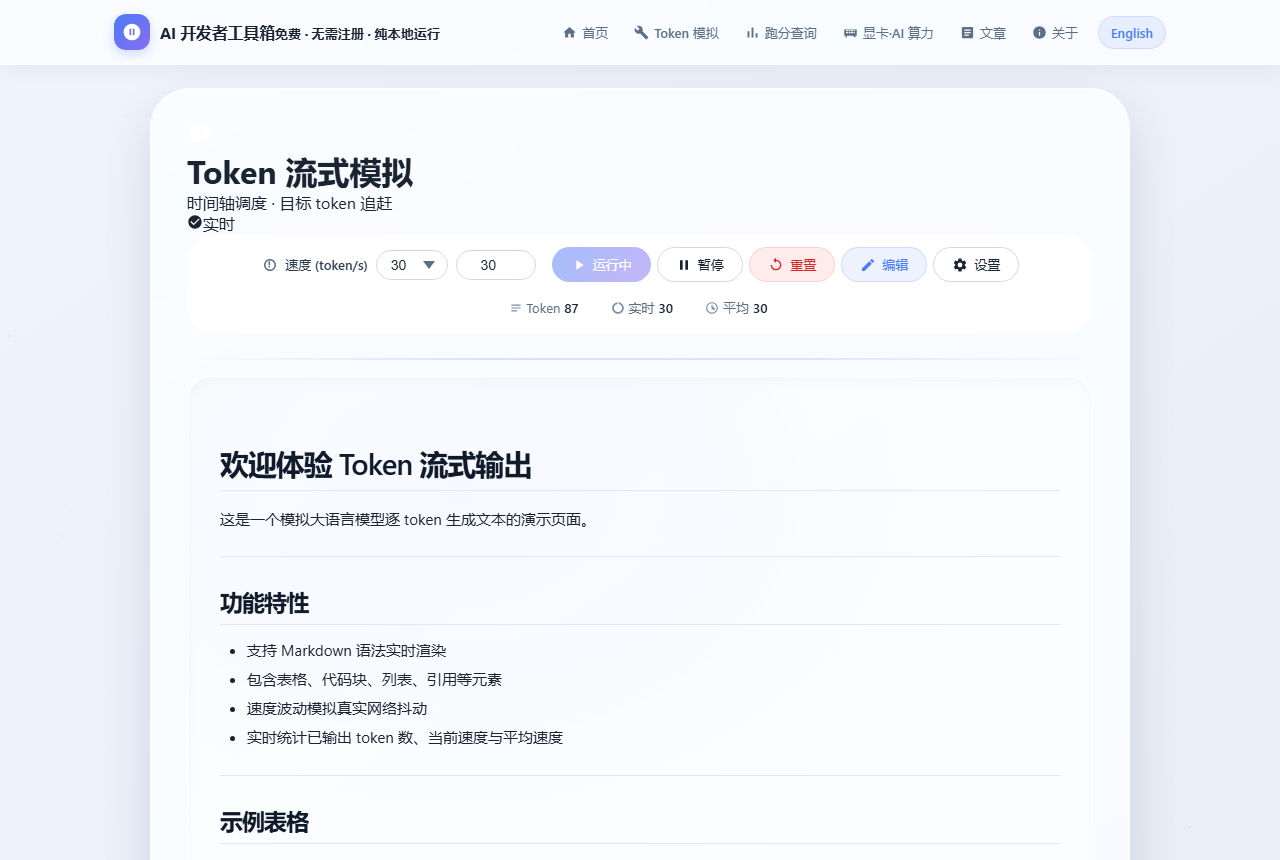
Token 流式模拟器:自定义速度逐 token 输出 Markdown
30 tok/s:能看清每个字出现;拉到 200 tok/s 以上就是旗舰模型的体验

几个好玩的玩法:把速度调到 5,体会"逐字蹦"的祖传体验;调到 500,感受推理引擎的暴力;点"编辑内容"换成你自己的 Markdown,做演示录屏特别合适。

给开发者的三句话

  • API 一律开 stream=true,首字延迟(TTFT)从十几秒降到几百毫秒,体验天差地别
  • 流式场景下的统计要用滑动窗口算瞬时速度,用总量除以耗时算平均速度
  • 长回答记得做"向上滚动即暂停自动跟随"——用户回看上文时别拽着他往下跳

最后提一句:tokens/s 只描述"生成速度"。Agent 场景下真正卡你时间的往往是预填充(prefill),那是另一个故事,感兴趣的看这篇显存、带宽与算力

免责声明:速度数据为公开资料的常见区间,实际因模型、负载、网络而异。

ChatGPT answers print like a typewriter, one word at a time. Search engines, meanwhile, spin for seconds and then dump the whole page. Why don't chatbots do the same? The answer is streaming — and it exists to save your patience.

LLMs generate token by token

Generation is inherently sequential: at each step the model predicts the next token given everything before it. A 1,000-word reply is hundreds of tiny predictions, and the server pushes each finished chunk to your browser immediately.

Waiting for the "complete" answer would leave users staring at an empty screen while the first word has already existed for seconds. Streaming just surfaces that reality. On the wire it's typically Server-Sent Events (SSE): the connection stays open and chunks keep arriving; the client renders as it receives. That's exactly what stream=true does in the OpenAI/Anthropic/DeepSeek APIs.

tokens/s — the speedometer for AI

SpeedExperience
< 10 tok/sPainfully slow for long replies
20–50 tok/sTypical hosted models; comfortable reading
50–150 tok/sFlagship APIs or high-end local GPUs
> 200 tok/sInference engines (vLLM, SGLang) with speculative decoding

The "live speed" you see in UIs is a sliding-window average, because generation speed is never constant.

Why the speed fluctuates

  • Server load: your request shares GPUs with others; queue depth varies
  • Content switching: tables and code blocks make the model "think" longer per token
  • Network jitter: chunks traverse the public internet and arrive unevenly

Feel it yourself

Our free Token Stream Simulator lets you set a target speed from 1 to 5,000 tok/s and watch Markdown render token by token, with live and average speed stats. Try 5 tok/s for the retro feel, or 500 for flagship-class speed. The Edit button accepts your own Markdown — great for demos and screen recordings.

For developers, in three lines

  • Always enable stream=true — time-to-first-token drops from many seconds to hundreds of milliseconds
  • Compute instantaneous speed with a sliding window; average speed as total tokens over elapsed time
  • Pause auto-scroll when the user scrolls up to reread — don't yank them to the bottom

Note that tokens/s only describes decode speed. In agent workloads, prefill often dominates — see VRAM, bandwidth and compute.

Disclaimer: speed figures are typical public ranges; actual results vary by model, load and network.
返回文章列表