最近一直在折腾本地跑大模型。网上关于显卡的资料是真不少,但都东一块西一块:这个帖子讲显存,那个文章测带宽,想查「我手里这张卡到底能跑哪个模型、速度大概多少」特别费劲。所以我自己干脆整理了一份速查表,从主流消费卡到二手数据中心卡都摸了一遍,现在把它搬到网上,配了一个在线速查工具,查起来更方便。
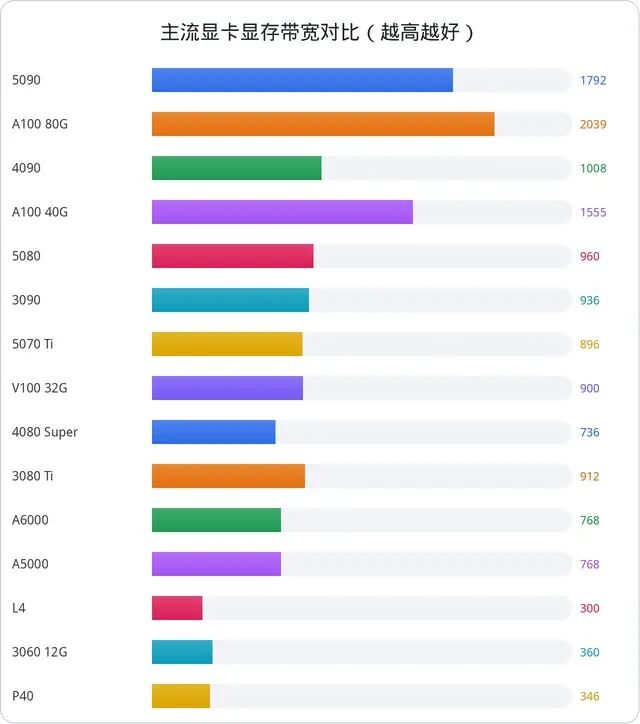
先说结论:本地跑大模型,真正卡脖子的不是算力,是显存和显存带宽。能不能跑看显存,跑多快看带宽。原理细节我写在另一篇科普里,这篇直接上数据和结论。
测算口径
- 精度统一 Q4_K_M(4bit 量化,质量损失 1~3%,社区默认甜点)
- 框架按 llama.cpp / Ollama 单用户口径,上下文 4K~16K
- 带
*的为社区实测值;没星号的是按带宽/算力公式推算,实际往往打 6~8 折 - 显存占用 = Q4 权重 + 约 2G 上下文缓冲
提醒一句上下文的坑:16K 上下文比 4K 大概掉 15~25% 速度(KV 缓存变大)。同一张卡跑 128K 长上下文和 8K 短对话,速度不是一个量级。
32B:24G 卡的黄金档位
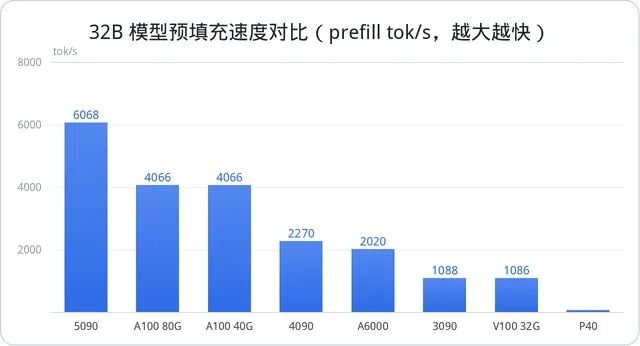
先看最有代表性的 32B 档。Q4 权重约 19.5G,24G 显存刚好装下还有富余:
| 显卡 | decode (tok/s) | prefill (tok/s) | 显存占用 |
|---|---|---|---|
| RTX 5090 (32G) | 70* | 6068 | 21.5G |
| A100 80G | 40* | 4066 | 21.5G |
| RTX 4090 (24G) | 38* | 2270 | 21.5G |
| RTX 3090 (24G) | 33* | 1088* | 21.5G |
| Tesla V100 32G(二手约 ¥3000-5000) | 33* | 1086 | 21.5G |
| RTX A6000 (48G) | 30* | 2020 | 21.5G |
| Tesla P40 (24G,二手约 ¥1200-2200) | 18* | 68 | 21.5G |
这张表信息量很大:二手 V100 32G 只要 3090 一半的价钱,生成速度却一样(带宽都是 900+ GB/s);而 P40 便宜是便宜,prefill 只有 68 tok/s——跑 1 万 token 的系统提示词,首字要等两三分钟,当 Agent 用基本没法忍。
8B / 14B:日常主力档
8B Q4 只要 5G 显存,几乎任何卡都能跑,差别只在快慢:
| 显卡 | 8B decode | 8B prefill | 14B decode |
|---|---|---|---|
| RTX 5090 | 198.7 | 16607 | 127.7 |
| RTX 4090 | 115* | 6213 | 70* |
| RTX 3090 | 104* | 2533 | 68* |
| RTX 5070 Ti | 99.3 | 7015 | 63.8 |
| Tesla V100 32G | 99.8 | 2973 | 64.1 |
| RTX 4080 Super | 88* | 4970 | 49* |
| RTX 2080 Ti | 68.3 | 824 | 43.9 |
| RTX 3060 12G | 42* | 999 | 26* |
这档 prefill 每秒几千到两万 token,日常聊天、写文档基本感受不到首字等待。
MoE 例外:Qwen3-30B-A3B,又快又聪明
这个模型总参数 30B,但每次只激活 3B——显存按 30B 算,速度却按 3B 算。24G 卡都装得下,速度还快得离谱:5090 实测 90 tok/s,4090 48,3090 44.6。预算内想上「大模型」又不想慢吞吞,优先看这类 MoE。
KV 缓存提醒:30B-A3B 开 128K 上下文时 KV 缓存(fp16)约 12.6G,总占用 31.2G,24G 卡装不下;KV 开 Q8 量化能压到 24.9G 勉强塞进,或者换 Q3_K_M 权重(14.7G)留足余量。
70B:得 48G 起步
70B Q4 权重 43G,单卡要 48G(A6000 二手 ¥12000-16000)或 80G(A100)。A100 80G decode 实测 28 tok/s,A6000 14.6。24G 卡单卡只能 offload,慢到没法用。235B 那种就是 2~8 张 80G 的集群玩法了,不是消费级的菜。
规格速查表
把 24 张卡的硬参数列在一起(价格为 2026 年 8 月参考区间,波动大别当定值):
| 显卡 | 显存 | 带宽 GB/s | TDP | 参考价 ¥ |
|---|---|---|---|---|
| RTX 5090 | 32G GDDR7 | 1792 | 575W | 20000-28000 new |
| RTX 5070 Ti | 16G GDDR7 | 896 | 300W | 6500-7500 new |
| RTX 4090 | 24G GDDR6X | 1008 | 450W | 8000-10000 used |
| RTX 3090 | 24G GDDR6X | 936 | 350W | 6000-7500 used |
| RTX 3080 Ti | 12G GDDR6X | 912 | 350W | 3500-4800 used |
| RTX 3060 12G | 12G GDDR6 | 360 | 170W | 1500-2200 |
| Tesla V100 32G | 32G HBM2 | 900 | 250W | 3000-5000 used |
| RTX A6000 | 48G GDDR6 | 768 | 300W | 12000-16000 used |
| A100 80G | 80G HBM2e | 2039 | 400W | 50000-80000 used |
| Tesla P40 | 24G GDDR5 | 346 | 250W | 1200-2200 used |
| NVIDIA L4 | 24G GDDR6 | 300 | 72W | 8000-13000 |
二手数据中心卡注意:服务器卡没风扇,得自己改散热;V100/P100 要留意有没有拆修史。
怎么选:我的建议
- 预算有限 / 刚入门:二手 RTX 3060 12G(¥1500-2200),8B/14B 稳稳跑;或二手 P40 24G 纯堆显存,适合不爱折腾速度的
- 性价比甜点(我最推荐):二手 4090(¥8000-10000)或 3090(¥6000-7500),24G 跑 32B + 30B-A3B MoE,覆盖 90% 本地场景
- 单卡天花板:5090 32G,32B Q4 七十多每秒,MoE 实测 90;2026 显存涨价明显,值不值看钱包
- 不想碰二手:5080 / 5070 Ti / 4080S(¥7500-11000),16G 跑 8B/14B 飞快,32B 得 offload
- 大显存捡漏:V100 32G(¥3000-5000)跑 32B 速度和 3090 一致还便宜一半;A6000 48G 单卡能干 70B
- 静音 / 长期开机:NVIDIA L4,72W 功耗,24G 够 32B Q4,塞 NAS 里正合适
有朋友问过我该买哪张卡,我的答案是:别为「以防万一」买单,按你最常跑的模型大小选显存,然后选带宽大的。24G + 高带宽,就是当前消费级的甜点。
完整数据可以在 显卡 AI 算力速查工具里查,102 款卡的 AI 评分和各模型 tok/s 都有。想看更全的显卡天梯,还有这篇 AI 算力天梯榜。